
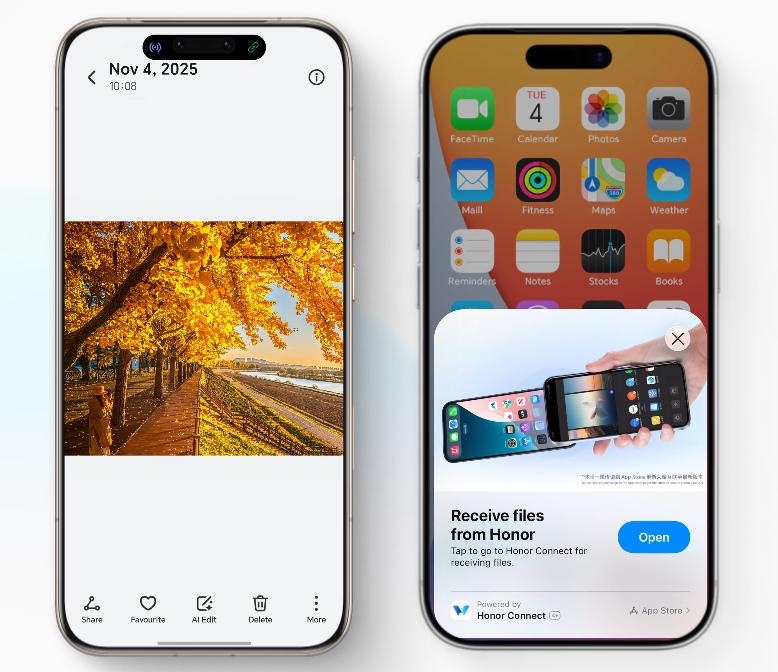
MagicOS 10.0 transforms multi-device sharing, making file and data transfer effortless. Users can connect their smartphones, tablets, and computers with this innovative feature, enhancing digital interactions. Forget constant emailing or cumbersome cables; MagicOS 10.0 offers a streamlined approach, allowing for efficient project work and quick media sharing. With just a few taps, users can transfer not only files but also contacts and schedules, creating a cohesive digital environment. By optimizing how devices interact, MagicOS 10.0 simplifies communication, making technology more intuitive and accessible. Whether you’re working from home or managing personal media, the seamless transfer capabilities of MagicOS 10.0 ensure a smooth, connected experience.
What MagicOS 10.0 Multi-Device Sharing Means
MagicOS 10.0 introduces a paradigm shift in how we manage digital content. This cutting-edge platform allows users to synchronize files across multiple devices effortlessly. Users experience a new level of connectivity, whether transferring photos, sharing documents, or managing calendar events. By leveraging the power of the cloud and local networks, MagicOS 10.0 enables real-time data transfer without the hassle of third-party applications. Users gain the freedom to access their information on any compatible device, ensuring consistency and reliability. As a result, productivity sees a significant boost, and daily interactions with technology become more intuitive and enjoyable. MagicOS 10.0 redefines multi-device management, setting a new standard for seamless integration.
Benefits of MagicOS 10.0 Multi-Device Sharing
Enhanced User Convenience
MagicOS 10.0’s multi-device sharing offers unparalleled convenience. Users no longer need to juggle multiple platforms or switch devices to access files, streamlining workflows. With just a tap, photos, videos, and important documents transfer across devices, whether it’s from a smartphone to a tablet or a computer. This integration reduces time spent managing files, enabling users to focus more on creative or productive tasks rather than administrative ones. The system intelligently identifies connected devices, facilitating instantaneous sharing and reducing setup time. MagicOS 10.0 ensures files are always at your fingertips, regardless of the device you’re using. This feature’s intuitive design simplifies interactions, making tech more accessible to everyone.
Unified Workflows
A unified workflow becomes possible with MagicOS 10.0, as it aligns digital processes across all devices. This means that updates made on one device instantly reflect on others, ensuring consistency. Whether editing a presentation on a computer or finalizing it on a tablet, continuity prevails. Unified workflows allow for seamless transitions between personal and professional tasks. By consolidating tasks across platforms, MagicOS 10.0 eliminates redundancy and optimizes performance. This cohesion improves efficiency, fostering a more engaged and productive user experience. The ability to access and modify files on the go, without interruption, transforms how users interact with their digital world. MagicOS 10.0 sets the groundwork for an integrated digital lifestyle.
How to Use Tap-to-Transfer & Instant Sharing?
Preparing Your Devices — Prerequisites and Setup
To take full advantage of MagicOS 10.0’s Tap-to-Transfer and Instant Sharing features, a few preparations are necessary. First, ensure all devices are updated to the latest version of MagicOS 10.0. Next, enable Bluetooth and Wi-Fi on all participating devices to facilitate seamless connections. Devices must be logged into the same MagicOS account to synchronize sharing capabilities. It’s also recommended to configure privacy settings, ensuring that files and data shared across devices remain secure. Once settings are verified, familiarize yourself with the MagicOS interface and quick settings panel, where Tap-to-Transfer options reside. Following these steps sets the stage for a smooth sharing experience.
Step-by-Step: Share Photos, Files, Contacts, and Schedules
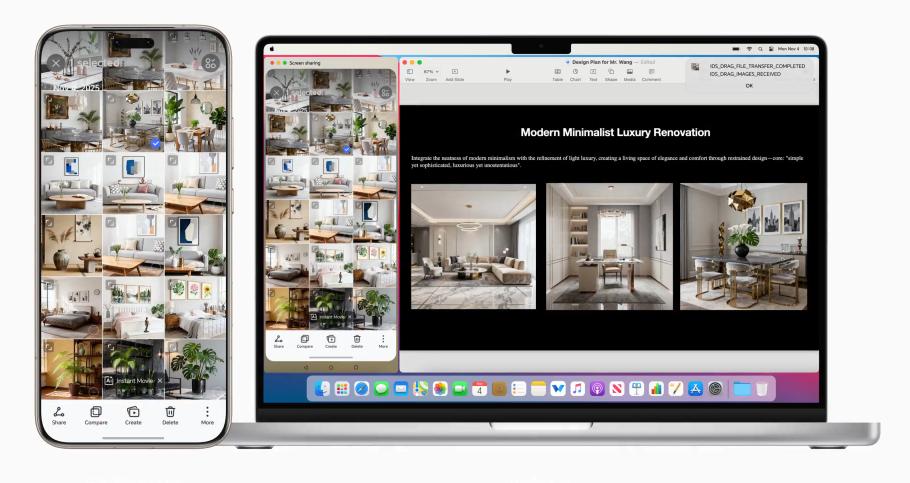
To begin sharing, open the file or item you wish to transfer on your device. For photos, access the gallery and select your desired images; for files, locate the document in your file manager. Once selected, tap the Share option and choose the receiving device from the list of available connections. Accept the transfer request on the receiving device, and watch as the files appear in moments. Sharing contacts and schedules follows a similar approach—access your contacts or calendar, select entries, and tap Share. Choose the recipient device and confirm the transfer. MagicOS 10.0 handles the rest, ensuring reliable, instant sharing.
Real-World Use Cases
Photo/Video Transfer Between Phone and Laptop
Transferring photos and videos has never been easier. Imagine capturing memories on your phone during a day out, then effortlessly sharing them with your laptop when you return home. With MagicOS 10.0, select the desired media on your phone, tap the Share icon, and choose your laptop from the list. Seconds later, watch those captured moments appear on your laptop’s screen, ready for editing or safekeeping. This capability is ideal for photographers or creatives who need quick access to high-quality files across devices. It eliminates the hassle of traditional file transfer methods, enhancing creative workflows.
Sharing Contacts, Calendar Events, and Documents Between Devices
Keeping contacts and schedules synchronized across devices is crucial in today’s fast-paced world. MagicOS 10.0 simplifies this by allowing effortless sharing of contacts and calendar events. Need to update a contact’s details? Make the change on one device and see it reflected across all others. Similarly, schedule a meeting on your tablet, and it instantly shows up on your smartphone. This cohesion extends to document sharing, where crucial files are accessible anytime, anywhere. By using MagicOS 10.0, users enhance their organizational skills, ensuring no detail slips through the cracks. This seamless integration elevates productivity and coordination in both personal and professional contexts.
Conclusion
MagicOS 10.0 revolutionizes how users share and synchronize data across devices, making file transfer an intuitive experience. With easy setup and robust sharing capabilities, interactions become streamlined, saving time and enhancing productivity. Whether for personal enjoyment or professional efficiency, MagicOS 10.0 offers the tools needed to connect a digital lifestyle seamlessly. Embrace the convenience and discover new possibilities by integrating all your devices into a cohesive ecosystem with MagicOS 10.0. Simplify your interactions, optimize your time, and explore the future of connected technology.
Leave a Reply